Appearance
Test Assignments with Live Server
Verify VS Code and Live Server work
Live Server is a tool you can use to see what your web pages will look like in a web browser. It is a simple web server that runs in VS Code that will serve up your HTML and CSS to a browser similar to the real world.
This is an optional step, but is highly recommended. You will be able to see exactly what the instructor will see when grading your work. By using Live Server while working on your assignments you will know what is working and not working, so you will have a solid idea of what grade you can expect.Create a Test HTML Page
Create a test folder in your CS-102 course folder, and create a simple HTML page. Then run Live Server to see your page rendered in the browser.
Prepare your first assignment folder
- Make a folder named
Assign1 - Unzip the Starter Kit into this new directory
- Verify you see
index.htmlandstyle.cssin the new folder
Start Live Server and View the Page
- Open VS Code
- Open
File | Open Folder
- Navigate to the
Assgn1folder and open
- In the VS Code Explorer panel (on the left) double-click
index.htmlto open - Click Go Live at the bottom-right of the VS Code window
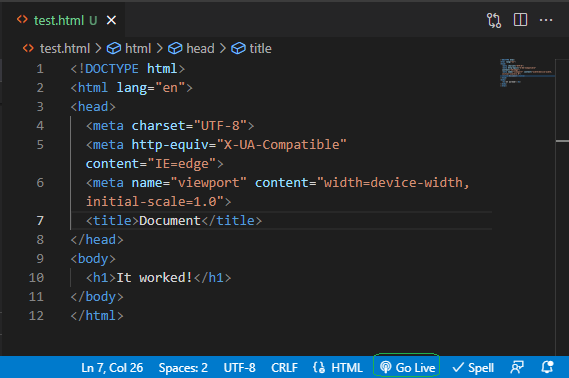
- A web browser will start with the page and It worked!* displayed
- If a browser was already open, a new tab will be created
Update a File to See Live Server Display Changes
Live Server will react to all saved changes and update the browser. So, you will see any updates immediately after you make and save changes.
In the
index.htmlfile, insert a line below<h1>It worked!</h1>Add a new HTML header by trying
html<h2>I had no doubt</h2>Save the file
Switch to the browser and note that the new text also appears
Make and save other updates a couple more times to see Live Server updates
- Close the Browser (or tab)
- Click the Port: 5500 button (where the Go Live button was previously)
Made a mistake and saved it?
No Problem! VS Code uses CTRL-Z to undo changes.
Save after undoing to see the Live Server update.
VS Code and the Live Server extension are ready for you to use for CS-102
Review
VS Code and Live Server are working.
When working on an assignment, you start Live Server once. Each time you make changes and save, Live Server will update the browser so you can see your changes.